
The Threat Model
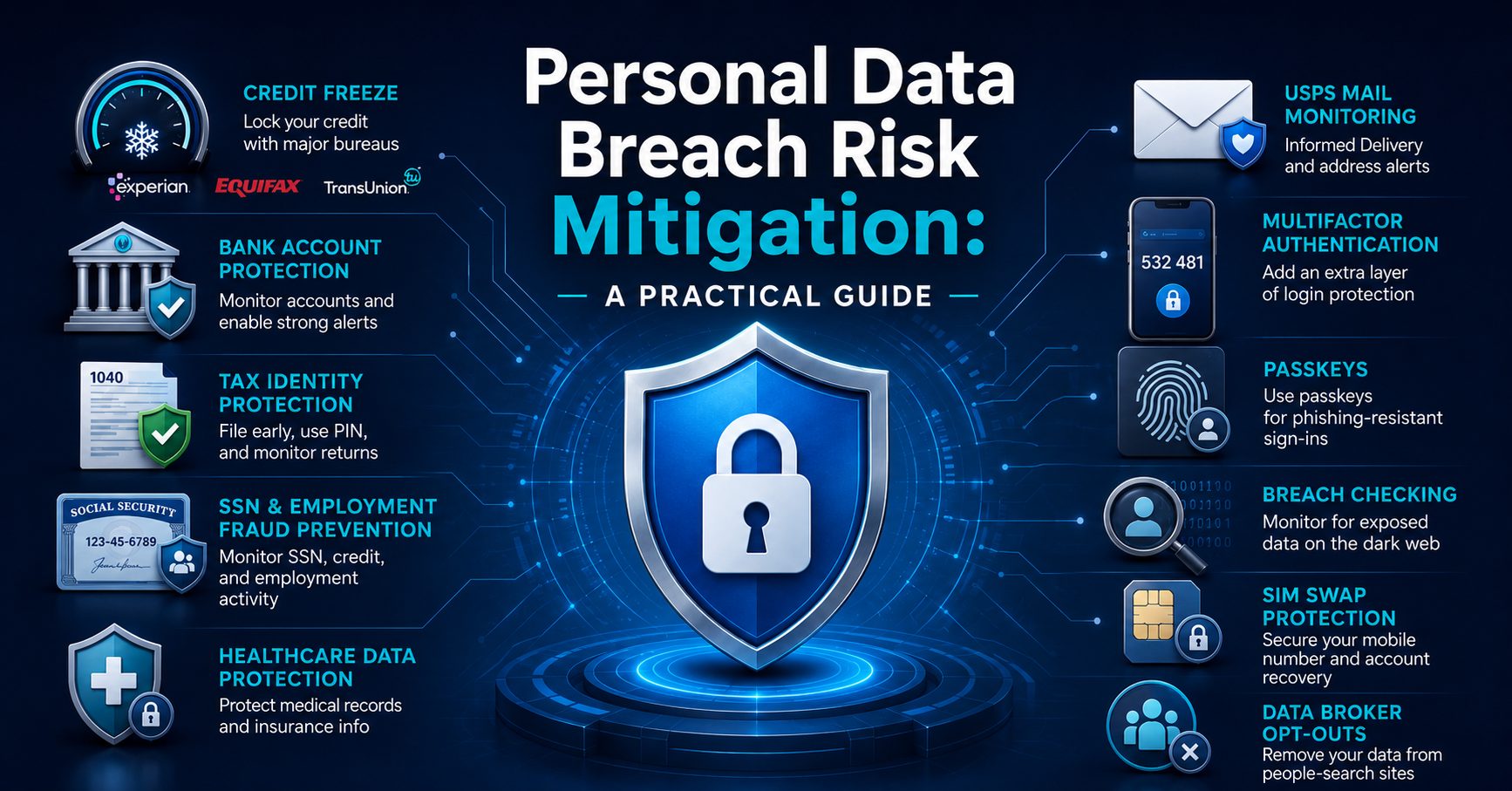
Let’s face it, your personal data is already out there. Not “may have been exposed.” Trust me, it has been. Assume it, and you’ll be better off. So, now, the question isn’t whether someone has your information; it’s whether it’s usable.
How they can be used, and the attack surfaces that actually matter: new credit accounts opened in your name, employment fraud using your SSN, fraudulent tax returns filed before you file yours, bank account takeover, and physical mail interception. Most of these are preventable with free government tools that the vast majority of people have never touched.
This guide walks you through all of them.
Quick-Start Checklist
Do these in order — the first five take about 90 minutes total and give you the most protection for your time. Full details on how and where to do each one follow below.
- Freeze your credit at Equifax, Experian, TransUnion, and Innovis
- Freeze ChexSystems (the banking equivalent of a credit bureau — prevents someone from opening a fraudulent bank account in your name)
- Get an IRS Identity Protection PIN (prevents someone from filing a tax return in your name)
- Set up E-Verify Self Lock (prevents someone from using your Social Security number to get a job)
- Enroll in USPS Informed Delivery (so you know what mail is coming to your address)
- Enable multi-factor authentication (MFA) or passkeys on all financial and government accounts
- Enable MFA or passkeys on all healthcare patient portals (MyChart, etc.)
- Lock your phone number against SIM swaps with your mobile carrier
- Run all your email addresses through haveibeenpwned.com to see if they’ve been exposed in a breach
- Pull your MIB and IntelliScript reports (your medical and prescription history reports — used by insurance companies the way lenders use credit bureaus) and check for anything you don’t recognize
- Sign up for a data broker removal service such as DeleteMe or Kanary to get your personal information scrubbed from people-search sites
If your Social Security number is already known to be compromised, also call the Social Security Administration at (800) 772-1213 to block electronic access to your SSA record.

Credit Freeze vs. Credit Lock: Know the Difference
Your credit score is a number between 300 and 850 that tells lenders how risky it is to lend you money. Everyone with a credit history has one — it’s calculated by the three major credit bureaus (Equifax, Experian, and TransUnion) based on your borrowing and repayment history. The higher the number, the better. Freezing your credit has zero impact on your score — it just slams the door on anyone trying to open new accounts in your name.
Credit Freeze (also called a security freeze) is your default choice. It is federally mandated and free to place, lift, and remove at all three major credit bureaus. It’s backed by federal law, which means the rules are clear and the legal protections are strong. When frozen, lenders can’t pull your credit file, so new accounts can’t be opened in your name. If you request a thaw online or by phone, the freeze must be lifted within one hour.
Credit Lock is a product offered by the bureaus — not a legal right. Locking your report is usually a feature of a subscription service, and canceling that subscription may unlock it. Locks are slightly faster to toggle on/off and often come bundled with monitoring alerts, but credit locks operate under private service agreements with fewer consumer protections than federal freeze legislation.
Bottom line: Freeze > Lock. Freezes are free, legally protected, and permanent until you lift them. Only consider a lock if you want the real-time toggle convenience and are already paying for a monitoring service.
You must freeze or lock each bureau separately. There is no master switch.
Equifax
https://www.equifax.com/personal/credit-report-services/credit-freeze
Experian
https://www.experian.com/freeze/center.html
TransUnion
https://www.transunion.com/credit-freeze
Innovis
The 4th bureau most people skip…
https://www.innovis.com/securityFreeze/index
ChexSystems
Used by banks for checking account applications, separate from credit bureaus.
https://www.chexsystems.com/security-freeze/place-freeze
You should freeze ChexSystems if you’re concerned about someone opening a fraudulent bank account in your name.
Fraud Alerts (Supplement to Freezes)
A fraud alert instructs lenders to take extra steps to verify your identity before extending credit. Unlike a freeze, it doesn’t block access — it adds friction. There are two types:
Standard fraud alert — free, lasts one year, renewable. You only need to file with one bureau; they’re required to notify the other two. Set it up here.
Extended fraud alert — lasts 7 years, requires a police report or FTC Identity Theft Report. For victims who’ve already experienced identity theft. https://www.identitytheft.gov/Steps
Fraud alerts don’t replace freezes — use both.
Lock Your Social Security Number (SSN)
“Locking your SSN” actually refers to two distinct protections in two different systems. Most people only know about one.
Block Electronic Access via the SSA
Calling the SSA at (800) 772-1213 to request a block on electronic access is the primary way to lock your Social Security number. This prevents anyone (including you) from viewing or modifying your Social Security records. If you need to make changes later, you can unlock it by calling again with proof of identity.
The SSA recommends doing this if your SSN has been compromised. It’s a blunt but effective tool — no one can access or update your SSA record online while this block is active. Check on your SSN status here.
E-Verify Self Lock (employment fraud)
Self Lock allows you to lock your SSN to prevent it from being misused in E-Verify. When you lock your SSN, nobody else can use it in E-Verify, which helps protect you from employment-related identity theft.
Why this matters: if someone uses your SSN to get a job, their wages are being reported in your name to the IRS and the SSA — meaning you could owe taxes on income you never earned. Self Lock blocks fraud at employers that use E-Verify (which is most large employers).
Self Lock is free and lasts for one year. Thirty days before the lock expires, you’ll have the option to extend it. You can unlock at any time if you’re applying for new jobs. Set it up here.
Important: Self Lock only protects E-Verify-participating employers. It doesn’t block all SSN misuse — just employment authorization fraud.
Health Data Protection
Health-related identity theft is distinct from financial identity theft and often harder to catch. Someone can use your identity to receive medical care, obtain prescriptions, or file fraudulent insurance claims — leaving errors in your actual medical record that can affect your future care and coverage. Review your Explanation of Benefits statements every time one arrives. Any line item for a service, prescription, or provider you don’t recognize warrants a call to your insurer.
MIB Group (Medical Information Bureau)
The MIB is the credit bureau of the health and life insurance world. Its member companies account for 99% of individual life insurance policies and 80% of health and disability policies issued in the US and Canada. It collects information on medical conditions and hazardous activities that insurance companies use to assess risk during underwriting. You’re entitled to one free report annually. Pull it, check it for errors, and dispute anything inaccurate. Errors here can cost you coverage or inflate your premiums.
https://www.mib.com/request_your_record.html
Phone: (866) 692-6901
Milliman IntelliScript
This is a separate specialty consumer reporting agency that tracks your prescription drug history. It gathers information from pharmacies, health insurance companies, and pharmacy benefit managers once you authorize the release of your records to an insurer. They will provide a free copy of your report upon request each year. Check it for medications you were never prescribed, a red flag for medical identity theft.
https://www.rxhistories.com/for-consumers
Your HIPAA Rights
Under HIPAA, you can request an “accounting of disclosures” from any covered healthcare provider. It’s a log of who has accessed or received your medical records, and when. This is an underused right. If you suspect someone has been using your identity to receive care, this is where you’d see the evidence. Submit the request in writing to your provider’s Privacy Officer.
Patient Portal Security
Every major health system (Epic/MyChart, Athena, etc.) now offers patient portals. Enable MFA and/or Passkeys on all of them. These accounts contain diagnoses, prescriptions, test results, and insurance information. Treat them the same way you treat your bank account.
Genetic Data — Delete or Opt Out
If you’ve used a consumer DNA service, your genetic data is in a commercial database. 23andMe filed for bankruptcy in 2025 and was acquired, putting genetic data for millions of users at risk of sale or transfer. If you’re a 23andMe customer, download your data and then delete your account and request deletion of your genetic sample from their labs. Other services (AncestryDNA, MyHeritage) have similar deletion options; exercise them.
One Key Limit to Know
HIPAA only covers “covered entities” — providers, insurers, and their business associates. It does not cover data brokers, wellness apps, fitness trackers, period tracking apps, or any app that isn’t explicitly part of your clinical care. That health data flows freely and is largely unregulated. Audit which health-adjacent apps have access to your data, and revoke access to anything you don’t actively use.
IRS Identity Protection PIN
An Identity Protection PIN (IP PIN) is a six-digit number that prevents someone else from filing a tax return using your SSN or ITIN. Tax-related identity theft is one of the most common and damaging breach outcomes — someone files a return in your name and collects your refund before you do.
An IP PIN is valid for one calendar year; new PINs are generated at the beginning of each calendar year. You must include your current IP PIN whenever you file a federal return. The fastest way to get one is through your IRS online account, in the IP PIN section of your profile page.
You can enroll proactively — you don’t have to be a breach victim to get one. Do it now.
Monitor Your Credit Reports
You’re entitled to free weekly credit reports from all three bureaus. Pull them, review them, and look for accounts you didn’t open.
https://www.annualcreditreport.com
Set a reminder to check quarterly at a minimum. If you have a freeze active, you’ll still see your own reports — the freeze only blocks external access.
Check If You’ve Been Breached
Enter your email addresses (all of them). This database tracks known breaches and shows which services leaked your data and what types of data were exposed. Set up alerts so you’re notified of future breaches.
USPS Mail Diversion Fraud
Criminals can submit a Change of Address form in your name and redirect your mail. This is more common than people realize and can intercept financial documents, credit cards, and government correspondence.
Enroll in USPS Informed Delivery — it sends you daily email previews of mail being delivered to your address, so you know what’s coming and can spot unauthorized redirects: https://informeddelivery.usps.com
Password Hygiene and MFA
None of the above matters if your email or financial accounts are compromised via credential stuffing and other attacks. Foundational requirements you should employ now:
- Unique passwords for every account — managed by a password manager such as 1Password, Apple, Okta, or Google.
- TOTP-based MFA (authenticator app) on every account that supports it, such as 1Password, Google, Microsoft, Apple, or Okta — not SMS, which is vulnerable to SIM swapping
- Passkeys wherever offered — they’re phishing-resistant by design
For high-value accounts (email, bank, brokerage, IRS, SSA, E-Verify), MFA is non-negotiable.
SIM Swap Protection
Contact your carrier and add a PIN or passcode required for any account changes, port requests, or SIM swaps. For AT&T, this is called “Wireless Account Lock”; for T-Mobile, this is called “Port Out Protection.” For Verizon, it’s “Number Lock.”
This prevents someone from porting your number to a new carrier and intercepting SMS-based MFA codes.
Data Broker Opt-Outs
Your name, address, phone number, relatives, and other PII are sold by data brokers and used to build profiles that enable advertising, phishing, social engineering, and physical targeting. This doesn’t “freeze” anything — it’s attrition — but reducing your footprint matters.
Manual opt-out starting point: https://privacyrights.org/data-brokers
For automated removal across hundreds of brokers, services like DeleteMe ($129/year) or Kanary handle this continuously.
If you really want a deep dive, try the Big Ass Data Broker Opt-Out List.
What to Do If You’re Already a Victim
If fraud has already occurred:
- File an FTC Identity Theft Report: https://www.identitytheft.gov
- File a local police report (needed for extended fraud alerts and some dispute processes)
- Place an extended fraud alert (7 years) with one bureau
- Dispute fraudulent accounts directly with the bureau reporting them — use CFPB’s dispute portal: https://www.consumerfinance.gov/consumer-tools/credit-reports-and-scores/








Leave a Reply